
At a glance
- Problem: Social workers completed a paper Needs Assessment of up to 30 pages and 90 possible answers, then typed the same information into the client record.
- What I did: Built a guided version of that assessment for laptops and tablets, inside the client system the organisation already used, so answers were captured during the session.
- What changed: The second round of data entry was removed. In observed testing, that saved about 8 to 16 minutes of admin after each 45 to 60 minute assessment (an estimate, not a formal time study). The form also stops common mistakes, such as too many goals or need categories.
- When: Delivered March 2026, after about a year of work.
Confidentiality note: The application, workflows and visuals have been generalised to protect client confidentiality and intellectual property. Specific identifiers and client terminology have been omitted.
The problem
Primary and Community Care Services (PCCS) had used this paper assessment for more than six years. The conversation itself took 45 to 60 minutes. Paper suited that part of the work, because the social worker was meant to talk with the client, not type the whole time.
The extra work came after the appointment. Staff had to re-enter the answers into the client record so the information could be used for reporting and for measuring outcomes. Handwritten notes could also be lost or damaged before anyone typed them in, and there was no second copy.
There was a second problem during the session. The assessment method belongs to PCCS. Staff who didn't know it well sometimes worked through topics that weren't relevant to that client, because the paper form didn't stop them. In testing, some people covered ground they didn't need to, on top of an already long appointment.
The approach
The original request was a separate phone app. Once the assessment was laid out, a phone screen was too small, so the realistic options were a work laptop or tablet.
I recommended keeping the assessment in Salesforce, the customer records platform PCCS already used, rather than adding another app with its own login and its own copy of client information. Staff could keep the accounts they already had. Results are saved to the client record in one direction only, to protect PCCS's intellectual property.
I worked with the systems and data team, around five social workers, and a PhD researcher in psychology. Mockups on a tablet were used to settle the order of questions, how much appeared on each screen, and when extra guidance should show.
How it worked
Social workers open the assessment, search for a client, and start a new assessment, continue one that was paused, or open a completed one. Because it sits in the same system as the client record, they aren't hunting through paper files or linking records by hand.
The screens follow the conversation rather than copying the paper form onto one long page:
- One topic at a time, with large controls that work on a tablet
- Guidance where the method needs it
- Checks that block invalid entries as staff work, including limits on goals and need categories
- Automatic saving, so an assessment can be paused and picked up later
- Notes and goal-setting after the structured questions, so the session stays on the client
- A results view on the client record, including a results table
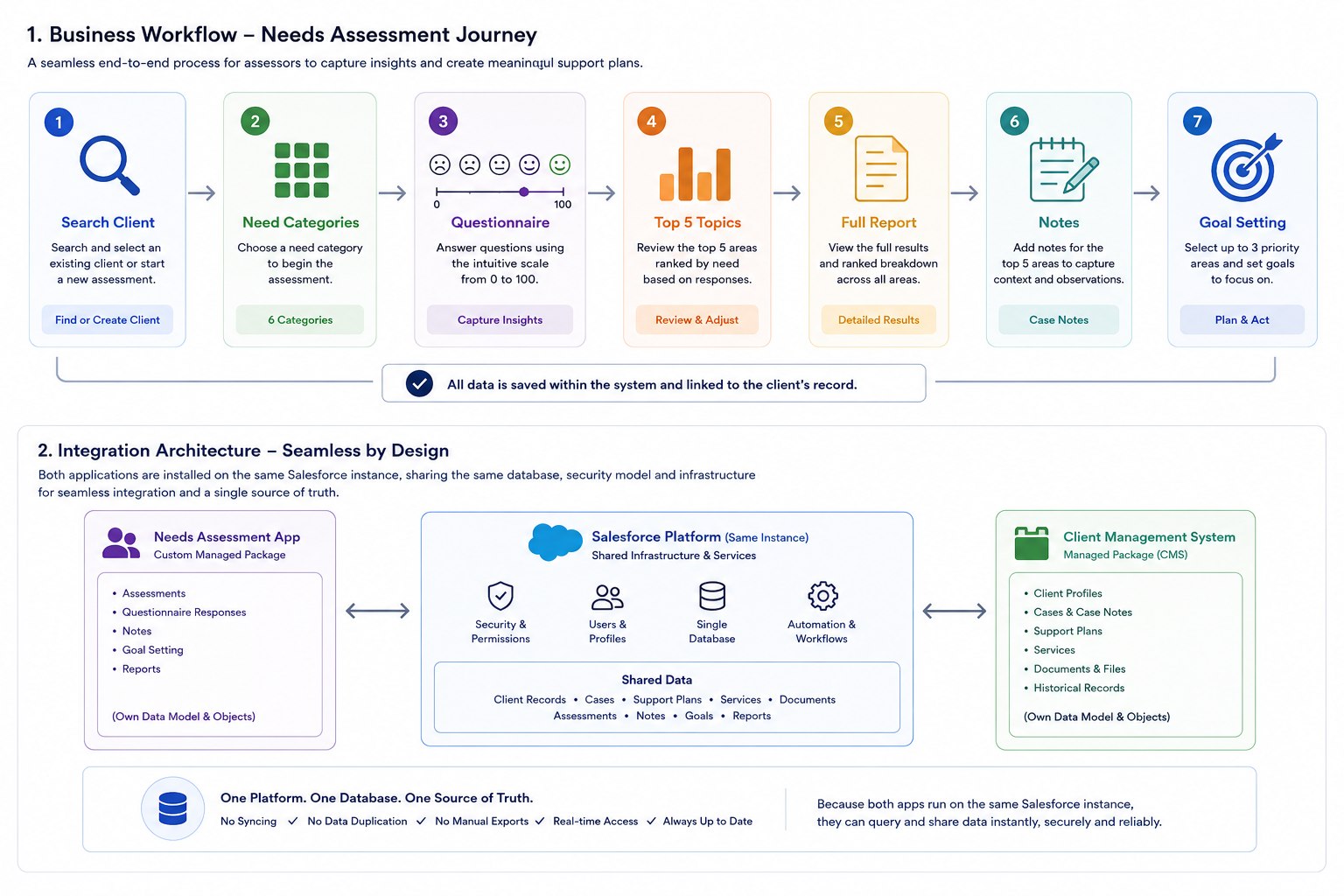
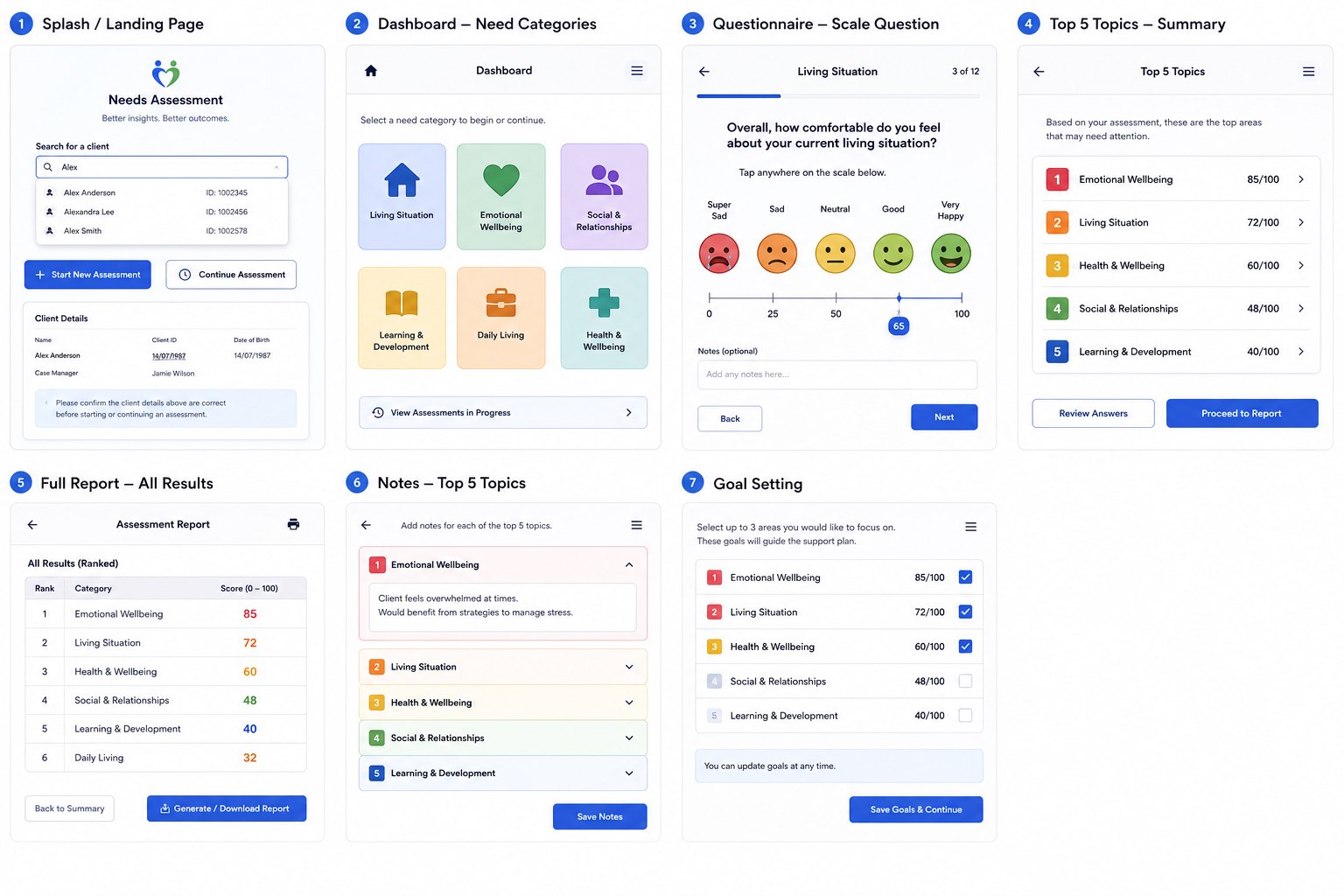
At the end, staff see the client's top five topics and a full report, then move into notes and a separate goal-setting stage. The record stays with the client for later reference, research, or audit. I didn't automate a reporting process as part of this project.
This was built on Salesforce because that's what PCCS already used for client records. I work with Salesforce when it fits. It isn't my main focus.
How the application was developed: requirements first, then repeated build and test cycles, then launch
Iterative development
The outcome
The application went live in March 2026, after about a year. I handled the business analysis, the build, and the technical delivery.
After the session (estimate from testing)
The assessment itself wasn't made shorter. The saving is the transcription that used to happen afterwards. Those timings come from test sessions where I watched staff re-enter the answers and noted how long it took. It's an estimate, not a formal time study.
A few caveats on that range. Testing was in a controlled environment that did not include real-world loading times. Most of the people who took part were already fairly comfortable with a keyboard and mouse, even without knowing shortcuts. In day-to-day use, less familiarity with the interface, slower reading of field labels, or other access needs can push some sessions well beyond 8 to 16 minutes.
Treating 8 to 16 minutes as a working estimate, the saving compounds quickly once you multiply by volume. These figures are arithmetic illustrations only, not measured production data:
- About 10 assessments a week across a small team of roughly five social workers: about 80 to 160 minutes saved each week (1.3 to 2.7 hours), or roughly 65 to 130 hours over a 48-week year.
- About 10 assessments a week per social worker × five people (50 assessments a week): about 7 to 13 hours a week, or roughly 320 to 640 hours a year, on the order of two to four months of full-time work returned to the team.
- Scaled further : for example twenty social workers at a similar pace (200 assessments a week): about 27 to 53 hours a week, or roughly 1,300 to 2,500 hours a year.
There was no study of uptake after launch, so I'm not quoting a user count or a volume of completed assessments. The per-assessment range is what was observed in testing; the weekly and yearly totals above are only to show how that range scales.
Have a process that needs digitising?
If your team is copying information off paper, or a workflow takes longer than the work itself, get in touch.